A/D-first output
Results say exactly which in-game key to press: A or D.
Guided Mapping
Enter before and after pin positions; the tool detects Same and Opposite links.
Plate image reference
Use the image to match Plate 1, Plate 2, and the rest correctly.
No-mod workflow
Runs locally in your browser. No game files, save edits, or account.
Why try a no-mod alternative first?
A Gothic Remake lockpicking mod can be useful, but it may change files, conflict with updates, or affect saves. This page offers a safer first step: solve the lock you see in the browser, then return to the game and press the listed A/D keys.
Start here
New to Gothic Remake lockpicking? Follow these four steps.
- Count the plates and pick that number in step 1.
- Set each current pin position (1-7, where 4 is the center target).
- Test the suggested A or D key on one plate, then enter the after positions.
- Repeat for every plate, then press Solve.
Loads a solvable 5-plate example so you can see the A/D output right away.
In-game controls
- A = move the selected plate left
- D = move the selected plate right
- W / S = select another plate
- Save before each mapping test
We show keys, not visual pin direction.
0 Plate numbering reference
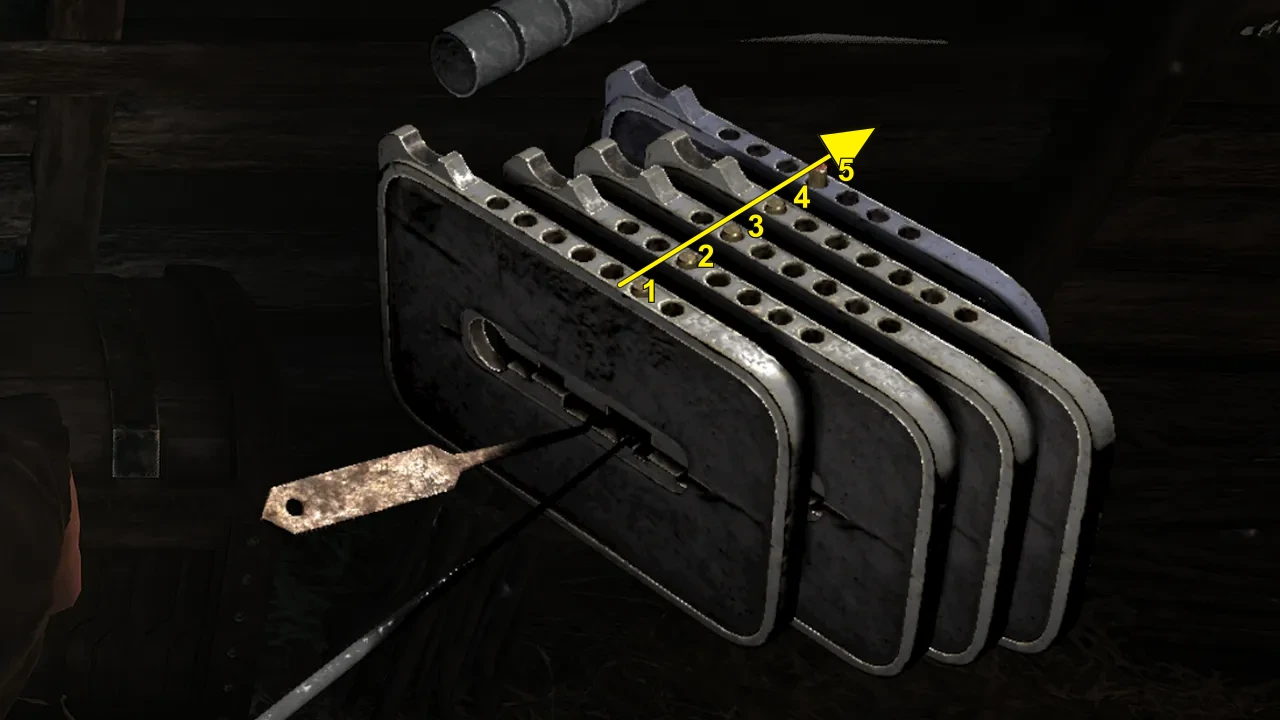
Reverse Plate Numbering switches the image and plate labels to match references that start from the inner/back plate. Click again to return to the default outer-to-inner order.
1 What do you see?
Supports 3–7 plates. Most Gothic Remake lockpicking puzzles appear to use 4–7. Each plate has 7 pin positions; position 4 is the center target.
Default path: use Guided Mapping below. If you already know the lock matrix, switch to Expert Matrix in step 3.
2 Current pin positions
Click each plate's current pin position from 1 to 7. Position 4 is the center target. The UI uses 1–7; the algorithm internally converts them to -3..+3.
3 Map plate interactions
Choose one setup path. Guided Mapping is recommended; Expert Matrix is only for locks where you already know Same, Opp., or Gone links.
3A Guided Mapping
Follow the current plate only: save or reload, press one A/D key once, record the after positions, then map that plate. When every row is mapped, continue to step 4.
3A. Test one plate
3B. After one key press
Enter what the lock looks like after that single key press. Do not solve yet; this only maps one row.
4 Safe A/D solution
When every plate is mapped, solve produces the in-game A/D sequence. Copy the steps or create a share link for Discord, Reddit, Steam, or a friend.
No-mod lockpicking workflow
Use the game as the source of truth
Count the visible plates and enter the current pin positions. The solver only needs what you can see, so it does not need game files or memory access.
Reload between mapping tests
For Guided Mapping, save before a test, press one A/D key, record the after positions, then reset or reload before testing the next row.
Mod alternative, not a mod replacement promise
This page targets players searching Gothic Remake lockpicking mod, lockpick mod, or remove lockpicking mod. It does not install a mod or remove the mini-game. It makes the mini-game easier to solve safely.
Common Gothic Remake lockpicking mistakes
- Reversing the plate numbering, so plate 1 and plate 7 are swapped.
- Mixing up the visual pin direction with the A/D key direction.
- Testing both A and D when one safe key test per plate is enough.
- Forgetting to reload before mapping the next plate.
- Typing Same/Opposite by hand when Guided Mapping can detect it.
FAQ
Is this safer than installing a lockpicking mod?
Yes. It runs in your browser and never touches game files, so there is nothing to install, update, or break when the game patches.
Does this tool edit my save game?
No. It only reads the positions you type and returns A/D steps. Your save, settings, and game files stay untouched.
Can I still install mods later?
Yes. Using this no-mod solver changes nothing in your game, so you remain free to add any mods you want afterwards.
Do I need to test both A and D for each plate?
No. One safe key test is enough for each plate. If the recommended key is unsafe at an edge, reload and test the opposite key for that same plate.
What do Same, Opp., and Gone mean?
Same means the affected plate follows the same key effect. Opp. means it moves the opposite way. Gone marks a removed link and is treated as no effect.
Fan-made tool. Not affiliated with, endorsed by, or sponsored by Alkimia Interactive, THQ Nordic, or the Gothic Remake development team.
Related tools
Use a focused page when the search wording changes.