Chest solver wording
Built for players searching Gothic Remake chest solver or lock helper.
Lockpick calculator
Turns observed plate data into a safe A/D sequence.
Guided Mapping
Maps interactions from one safe test per plate.
Shareable output
Copy the solution or create a share link for the mapped lock.
Lock solver, chest solver, calculator, helper
Different players use different words for the same problem. A Gothic Remake lock solver, Gothic lock solver, chest solver, lockpick calculator, and lock helper all point to the same need: convert the lock state into safe A/D steps.
This page bridges those terms and sends you directly to the same Guided Mapping solver.
Start here
New to Gothic Remake lockpicking? Follow these four steps.
- Count the plates and pick that number in step 1.
- Set each current pin position (1-7, where 4 is the center target).
- Test the suggested A or D key on one plate, then enter the after positions.
- Repeat for every plate, then press Solve.
Loads a solvable 5-plate example so you can see the A/D output right away.
In-game controls
- A = move the selected plate left
- D = move the selected plate right
- W / S = select another plate
- Save before each mapping test
We show keys, not visual pin direction.
0 Plate numbering reference
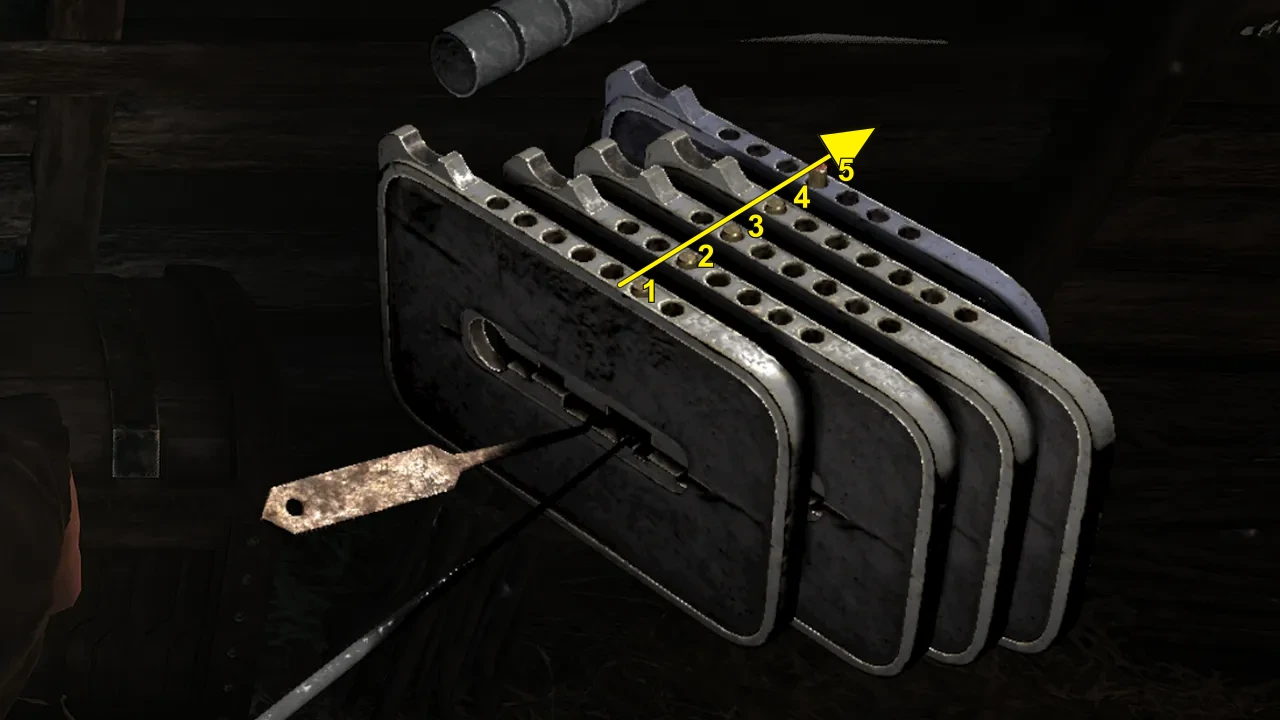
Reverse Plate Numbering switches the image and plate labels to match references that start from the inner/back plate. Click again to return to the default outer-to-inner order.
1 What do you see?
Supports 3–7 plates. Most Gothic Remake lockpicking puzzles appear to use 4–7. Each plate has 7 pin positions; position 4 is the center target.
Default path: use Guided Mapping below. If you already know the lock matrix, switch to Expert Matrix in step 3.
2 Current pin positions
Click each plate's current pin position from 1 to 7. Position 4 is the center target. The UI uses 1–7; the algorithm internally converts them to -3..+3.
3 Map plate interactions
Choose one setup path. Guided Mapping is recommended; Expert Matrix is only for locks where you already know Same, Opp., or Gone links.
3A Guided Mapping
Follow the current plate only: save or reload, press one A/D key once, record the after positions, then map that plate. When every row is mapped, continue to step 4.
3A. Test one plate
3B. After one key press
Enter what the lock looks like after that single key press. Do not solve yet; this only maps one row.
4 Safe A/D solution
When every plate is mapped, solve produces the in-game A/D sequence. Copy the steps or create a share link for Discord, Reddit, Steam, or a friend.
How this lock solver handles chests and locks
No fixed answer required
Because plate interactions can vary, this page does not claim a universal chest code. It solves the lock state you enter.
Calculator-style result
After mapping, the output is a numbered sequence: select a plate, press A or D, repeat. Use Show expected states when you want to verify the path.
When to use this page instead of the guide
Use this page when your search phrase is about a lock solver, chest solver, lockpick calculator, or lock helper. Use the main guide when you want a broader explanation of Gothic Remake lockpicking.
Safe mapping checklist
- Save before each test so a broken pick costs nothing.
- Test one plate at a time.
- Press one key only once, then stop.
- Enter the after positions immediately.
- Reload before mapping the next plate.
FAQ
Do I need to test both A and D for each plate?
No. One safe key test is enough for each plate. If the recommended key is unsafe at an edge, reload and test the opposite key for that same plate.
Does this work for chests as well as doors?
Yes. Chests, doors, and gates in Gothic Remake use the same moving-plate mechanic, so the same A/D solution applies to any of them.
Is this a lockpick calculator?
It works like one. Instead of guessing, you enter what you see on the lock and it calculates a safe A/D key sequence that centers every pin.
How many plates can the lock solver handle?
Any lock from 3 to 7 plates. Pick the count in step 1, set the current positions, and map each plate once before you solve.
What do Same, Opp., and Gone mean?
Same means the affected plate follows the same key effect. Opp. means it moves the opposite way. Gone marks a removed link and is treated as no effect.
Fan-made tool. Not affiliated with, endorsed by, or sponsored by Alkimia Interactive, THQ Nordic, or the Gothic Remake development team.
Related tools
Use a focused page when the search wording changes.