A/D-first output
Results say exactly which in-game key to press: A or D.
Guided Mapping
Enter before and after pin positions; the tool detects Same and Opposite links.
Plate image reference
Use the image to match Plate 1, Plate 2, and the rest correctly.
No-mod workflow
Runs locally in your browser. No game files, save edits, or account.
Gothic lockpick solver workflow
This page focuses on the Gothic lockpick solver intent: enter the visible plate positions, map one safe key test per plate, and get a reusable A/D sequence.
Start here
New to Gothic Remake lockpicking? Follow these four steps.
- Count the plates and pick that number in step 1.
- Set each current pin position (1-7, where 4 is the center target).
- Test the suggested A or D key on one plate, then enter the after positions.
- Repeat for every plate, then press Solve.
Loads a solvable 5-plate example so you can see the A/D output right away.
In-game controls
- A = move the selected plate left
- D = move the selected plate right
- W / S = select another plate
- Save before each mapping test
We show keys, not visual pin direction.
0 Plate numbering reference
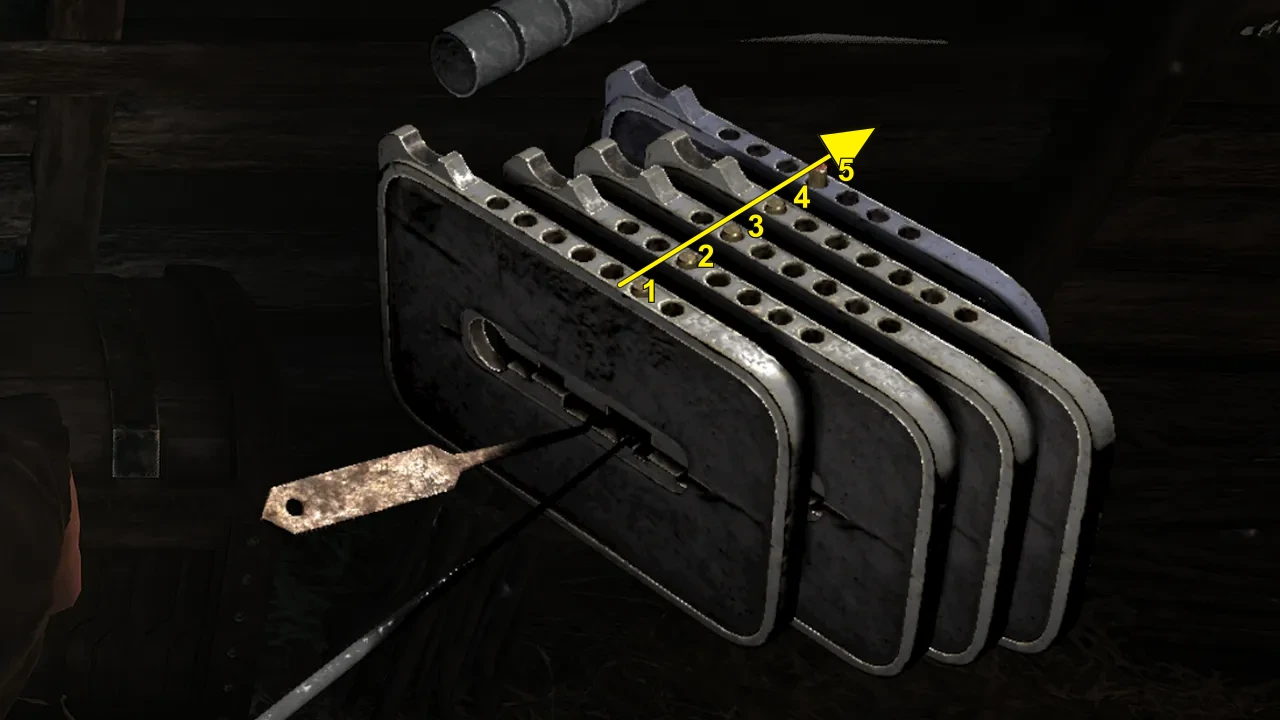
Reverse Plate Numbering switches the image and plate labels to match references that start from the inner/back plate. Click again to return to the default outer-to-inner order.
1 What do you see?
Supports 3–7 plates. Most Gothic Remake lockpicking puzzles appear to use 4–7. Each plate has 7 pin positions; position 4 is the center target.
Default path: use Guided Mapping below. If you already know the lock matrix, switch to Expert Matrix in step 3.
2 Current pin positions
Click each plate's current pin position from 1 to 7. Position 4 is the center target. The UI uses 1–7; the algorithm internally converts them to -3..+3.
3 Map plate interactions
Choose one setup path. Guided Mapping is recommended; Expert Matrix is only for locks where you already know Same, Opp., or Gone links.
3A Guided Mapping
Follow the current plate only: save or reload, press one A/D key once, record the after positions, then map that plate. When every row is mapped, continue to step 4.
3A. Test one plate
3B. After one key press
Enter what the lock looks like after that single key press. Do not solve yet; this only maps one row.
4 Safe A/D solution
When every plate is mapped, solve produces the in-game A/D sequence. Copy the steps or create a share link for Discord, Reddit, Steam, or a friend.
How to use this Gothic lockpick solver
Guided Mapping path
- Choose the plate count.
- Set each current pin position from 1 to 7.
- Test the recommended A/D key for one plate.
- Enter the after positions and infer that row.
- Repeat until every row is mapped, then solve.
Expert Matrix path
If you already know the coupling matrix, switch to Expert Matrix and enter Same, Opp., Gone, or no effect directly. This is faster for repeat players but less forgiving if one relation is wrong.
What this solver does and does not do
The solver searches for a safe sequence of A/D presses that centers all pins without crossing an edge. It does not read game memory, install anything, or claim universal fixed lock combinations.
Use share links to send a mapped lock to a friend or to keep a difficult chest setup for later.
When the solver says no solution
- Check the plate numbering and try the reverse order.
- Make sure every plate row is mapped, not skipped.
- Re-test the plate that caused an edge break.
- Switch to Expert Matrix only if you already know the coupling.
- Try Easy Fast mode if the lock has 7 plates.
FAQ
Do I need to test both A and D for each plate?
No. One safe key test is enough for each plate. If the recommended key is unsafe at an edge, reload and test the opposite key for that same plate.
Can I copy the solution steps?
Yes. Press Copy to put the full A/D step list on your clipboard, then paste it next to the game while you pick the lock.
Can I share my lock setup?
Yes. Share creates a link that stores your plate count, pin positions, and mapping, so anyone can reopen the exact same lock.
Why does Shortest mode differ from Easy mode?
Easy modes reduce how often you switch plates so there is less in-game fumbling. Shortest modes minimize the total number of key presses. Both return an edge-safe solution.
What do Same, Opp., and Gone mean?
Same means the affected plate follows the same key effect. Opp. means it moves the opposite way. Gone marks a removed link and is treated as no effect.
Fan-made tool. Not affiliated with, endorsed by, or sponsored by Alkimia Interactive, THQ Nordic, or the Gothic Remake development team.
Related tools
Use a focused page when the search wording changes.